The mobile version: what you get in the first ten minutes, first hour, and first week
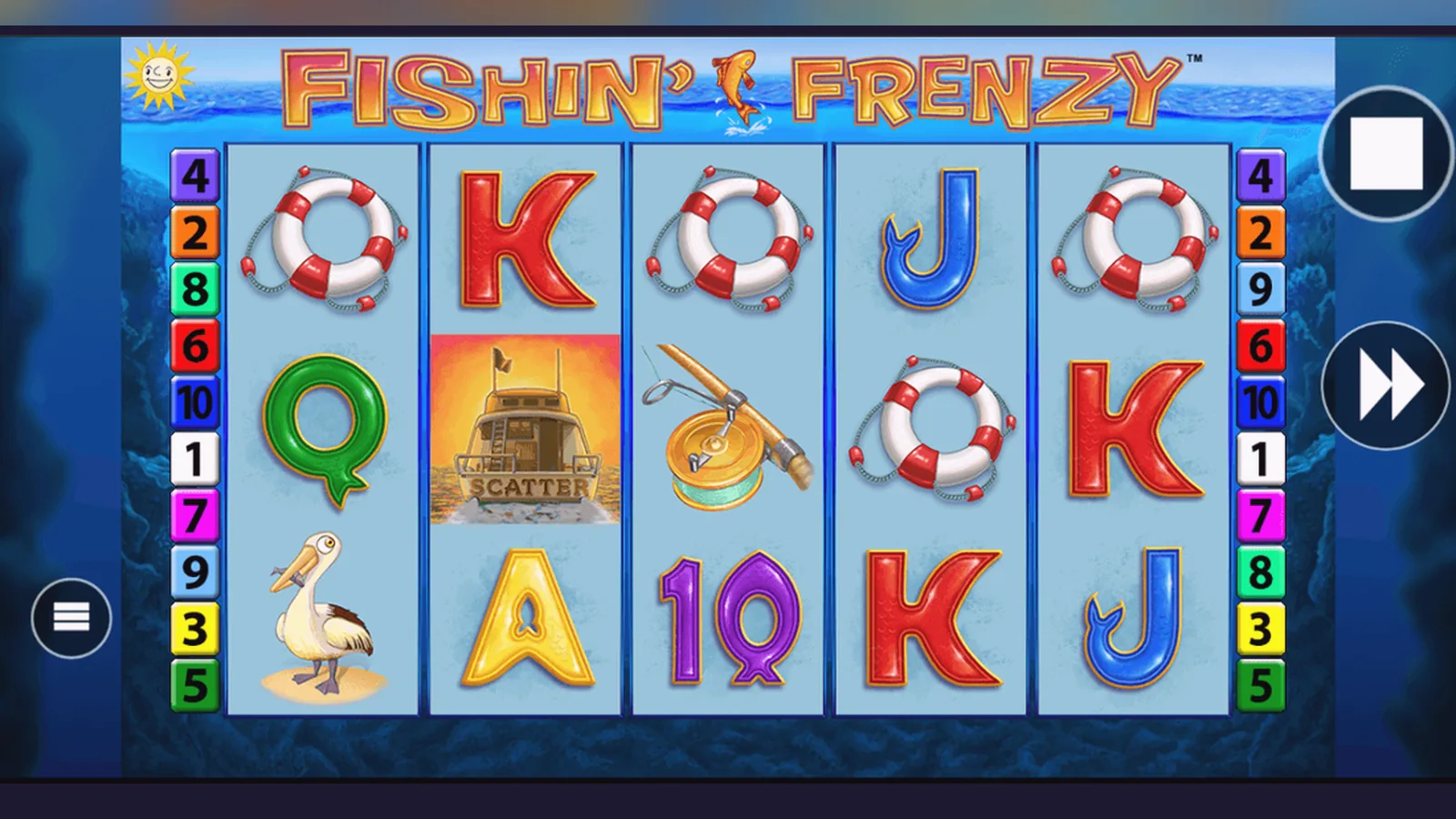
Most players reach the reels within two minutes — some via a browser shortcut, others through an operator's native app, a handful by sideloading an APK they found on a forum. The route you pick changes how much friction you hit, how quickly you can deposit, and whether you're exposing your phone to unnecessary risk.
This page maps the four install paths, walks you through what the first ten minutes look like, then what changes after an hour and a week. You'll also see the store-style card with version numbers and permissions, screen descriptions written out in words, and the red flags that separate a legitimate build from a clone designed to harvest credentials.
Store card: the version you'll find on licensed sites
Fishin' Frenzy isn't a standalone app in the Google Play or App Store; instead, it lives inside the web catalogues of UKGC-licensed operators or as a progressive web app you add to your home screen. The numbers below reflect a typical operator wrapper that includes this game alongside hundreds of others.
The four install routes, ranked by friction and risk
You have four ways to get Fishin' Frenzy on your phone. Each has a different balance of speed, security, and deposit convenience.
- Browser play (no install): Open Safari or Chrome, navigate to a UKGC-licensed site, log in or create an account, find Fishin' Frenzy in the catalogue, tap Play. The game loads in the browser. Risk: none, beyond the site's own security. Friction: you type the URL every time, though you can bookmark it.
- Add to home screen (progressive web app): While the game or lobby is open in your browser, tap the Share icon (iOS) or the three-dot menu (Android), then «Add to Home Screen». You get an icon that launches the site in a chromeless window. Risk: minimal — it's still the operator's domain, served over HTTPS. Friction: one extra step at setup, then instant access. This is the path most UK players use.
- Operator's native app (Play Store or App Store): Some licensed operators publish a full app. Download it from the official store, install, log in with your existing account or register, navigate to Fishin' Frenzy. Risk: low if the developer name matches the operator's UKGC register entry. Friction: app store approval delays updates; the file is larger.
- APK sideload (Android only): Download an APK from a third-party mirror, enable «Install unknown apps» in Settings, run the installer. Risk: high — you're bypassing Play Protect, and the APK could be repackaged with malware or credential-harvesting code. Friction: minimal after you disable the safety guard, but you lose automatic updates and have no recourse if something goes wrong. Not recommended unless you've verified the APK hash against the operator's official checksum, which few sites publish.
The first ten minutes: from tap to first spin
Minute 0: You tap the icon or type the URL. If you chose the progressive web app route, the operator's lobby appears in under two seconds on a decent 4G connection.
Minute 1: You're asked to log in or register. Registration requires an email, password, date of birth, and postcode for the initial age check. Some operators use credit-reference lookups at this stage; others defer that until your net deposits cross £150.00 in a calendar month, triggering the first affordability check.
Minute 3: You're logged in. The lobby shows a search bar at the top and a grid of game tiles below. Type «Fishin'» and the autocomplete surfaces Fishin' Frenzy, Fishin' Frenzy Megaways, and a handful of themed sequels.
Minute 4: Tap the tile. A loading spinner appears for two to five seconds while the game engine and asset bundle download. The screen resolves into the main interface: a cartoon fishing boat centred at the top, a 5×3 grid of reels below, and a control strip at the bottom showing balance, stake, spin button, and a hamburger menu.
Minute 5: Before you can spin, the operator checks whether you've completed KYC. If this is your first session, a banner prompts you to upload a photo ID and proof of address. You can play in demo mode while you wait, but you cannot deposit or withdraw until the documents clear, which takes 24 to 48 hours.
Minute 7: You switch to demo mode. The balance changes to a fixed £100.00 play-money credit. You set the stake to £1.00 per spin — the slider goes from £0.10 to £5.00, with a red warning if you're in the 18–24 age bracket reminding you of the £2.00 cap. You tap Spin.
Minute 8: The reels animate for roughly two seconds. A mix of fish symbols and low-value playing-card icons land. No feature triggers. Your demo balance drops to £99.00. The interface is responsive; the next spin starts the moment you tap again.
Minute 10: You've run through a dozen spins. The boat symbol — the scatter — appeared twice on reel one and once on reel three, but you need three to launch the free-spins round. The hamburger menu reveals options for sound, game rules, paytable, and responsible-gambling tools (GAMSTOP link, deposit limits, session reminders).
The first hour: deposit, KYC queue, and the stake-cap reminder
After fifteen minutes in demo mode, you decide to deposit. You tap the balance display, which takes you to the cashier. The operator lists debit card (Visa or Mastercard), PayPal, Apple Pay, Trustly via Open Banking, and paysafecard. Credit cards have been banned for gambling in the UK since April 2020, so that option doesn't appear.
You choose PayPal and enter £20.00. The system asks you to confirm your date of birth again — a double-check that you're over 18 — then redirects you to PayPal's login. You authorise the payment, and within ten seconds the £20.00 appears in your casino balance.
Back at Fishin' Frenzy, you set the stake to £2.00 per spin. A pop-up reminds you that if you're aged 18 to 24, the maximum stake is £2.00; for players 25 and older, it's £5.00. You confirm your age bracket, and the slider locks at £2.00. This is a UKGC requirement introduced in stages between 2021 and 2024 to reduce harm among younger adults.
Forty minutes in, you've triggered the free-spins feature twice. The first round paid £18.40; the second paid £4.60. Your balance sits at £26.80, and you decide to withdraw £20.00 to test the process. The cashier asks you to upload your documents if you haven't already. You take a photo of your driving licence and a recent bank statement with your address visible, then submit.
A message confirms that verification usually takes 24 to 48 hours. Until then, you can keep playing, but you cannot complete the withdrawal. This is standard across all UKGC sites; the delay protects both you and the operator from fraud and underage gambling.
The first week: faster withdrawals, session tracking, and affordability nudges
Day two: Your documents clear. You submit the £20.00 withdrawal again, this time choosing Faster Payments to your bank account. The operator confirms that e-wallets like PayPal typically arrive within a few hours to 24 hours, while bank transfers take the same day to two working days. Your £20.00 lands in your account the next morning — roughly 18 hours after you requested it.
Day three: You deposit another £30.00 and play for 90 minutes. The app starts displaying session-time reminders every 60 minutes, a feature the UKGC mandates. A banner pops up: «You've been playing for 1 hour. Take a break?» You can dismiss it or set a limit for the next session.
Day five: Your total net deposits since registration reach £155.00 across three separate sessions. The next time you log in, a message explains that under UKGC affordability rules, operators must check your financial situation once net deposits exceed £150.00 in a calendar month. The first stage uses credit-reference data — no documents required yet — and happens in the background. If your deposits climb higher or the data flags a concern, you may be asked for bank statements or payslips.
Day seven: You've opened the app 14 times, played Fishin' Frenzy in eight of those sessions, and tried two other slots in the catalogue. The operator's algorithm has logged your play pattern and starts showing targeted safer-gambling prompts if your session length or stake size spikes suddenly. You also receive an email summarising your week: total deposits, total withdrawals, net position, and links to GAMSTOP (the UK self-exclusion scheme) and BeGambleAware.
Screen walkthroughs: what you see at each stage
Screen one — the lobby: A hero banner at the top cycles through promotions (welcome offers, reload bonuses, new-game launches). Below that, a navigation bar with tabs: Slots, Table Games, Live Casino, Promotions, Account. A search field sits in the top-right corner. The grid of game tiles starts immediately below, each tile showing the game's thumbnail, title, provider name, and a small info icon. Tapping the tile launches the game; tapping the info icon opens a pop-up with RTP, volatility, and maximum win.
Screen two — the game interface: Fishin' Frenzy occupies the full viewport. The fishing boat graphic is anchored at the top centre, animated with a gentle rocking motion. The 5×3 reel grid sits below, framed by cartoon water and a wooden pier. The control strip at the bottom left shows your balance in £ format (e.g. £26.80), the current stake per spin, and a minus/plus button to adjust it. The Spin button is a large green circle in the bottom centre. The hamburger menu (three horizontal lines) is in the bottom right, next to a smaller Autoplay button.
Screen three — the free-spins bonus: When you land three or more boat scatters, the screen dims and a pop-up announces «Free Spins!» with the number awarded (10, 15, or 20 depending on scatter count). You tap Continue, and the reels reload with a slightly different background — deeper water, more dramatic lighting. A counter in the top-left corner tracks spins remaining. During the feature, all fish symbols collect prizes, and a fisherman wild can appear on the middle reel, awarding the cumulative total of all visible fish. When the feature ends, a summary screen shows total win, then returns you to the base game.
Screen four — the responsible-gambling menu: Accessed via the hamburger icon, this overlay lists deposit limits (daily, weekly, monthly), loss limits, session-time reminders, reality checks, and a large button labelled «Self-Exclude via GAMSTOP». Each limit can be set or adjusted, with a 24-hour cooling-off period before increases take effect. A link to your account history shows deposits, withdrawals, and net position for the current month.
Screen five — the cashier: Split into two tabs: Deposit and Withdraw. The Deposit tab shows payment icons (debit card, PayPal, Apple Pay, Trustly, paysafecard), an amount field pre-populated with £10.00, £20.00, £50.00 quick-select buttons, and a Custom amount option. The Withdraw tab mirrors this but limits you to methods you've deposited with (a UKGC anti-money-laundering rule). If KYC is incomplete, a yellow banner at the top explains that you cannot withdraw until documents are verified, with an «Upload Now» link.
Phone requirements: what you need to run the game smoothly
Fishin' Frenzy runs in HTML5, so it adapts to most devices released in the past five years. The minimum specs: a smartphone with at least 2 GB of RAM, a screen resolution of 720×1280 (though 1080×1920 or higher gives sharper graphics), and iOS 13 / Android 8.0 or newer. Safari, Chrome, and Samsung Internet are all supported; older versions of Opera Mini struggle with the canvas animations.
Network requirements: a stable 4G connection or Wi-Fi is ideal. The initial asset bundle is roughly 12 MB; after that, each spin sends and receives a few kilobytes of data. On a patchy 3G connection, you'll see stuttering animations and delayed responses after tapping Spin.
Storage: if you install the progressive web app or an operator's native app, expect 30 to 50 MB including the lobby framework and cached assets. The browser version uses cache storage but leaves no permanent footprint beyond cookies and local storage for your session token.
What's new in version 7.4.1 (December 2025)
- Faster reel animations: spin cycle reduced from 2.1 seconds to 1.8 seconds on devices with GPU acceleration.
- Enhanced free-spins counter: now displays running total win in real time during the bonus round, rather than waiting until the end.
- Improved accessibility: screen-reader labels added to all interactive elements; contrast ratio on the paytable increased to meet WCAG 2.1 AA.
- Bug fix: resolved an issue where the Autoplay counter would not decrement correctly if you switched tabs mid-session.
- Regulatory update: session-time reminder now triggers at 60 minutes instead of 90, aligning with updated UKGC guidance published in November 2025.
Fake clones and permission red flags: how to spot trouble
Fake versions of popular slots circulate on APK mirrors, often bundled with adware or credential-harvesting scripts. Warning signs: the developer name doesn't match a UKGC-licensed operator; the download page promises «unlimited coins» or «hack the RNG»; the APK requests permissions that make no sense for a browser-based casino game.
Permissions a legitimate app might ask for: storage (to cache assets), network access (to communicate with the casino server), and optionally camera (if you upload KYC documents from within the app). Red flags: SMS read/write, call logs, contacts, microphone when not used for customer support, and «install other apps» (a sign the APK wants to drop additional payloads).
Before you sideload, check the APK hash against the operator's published checksum if available. If the operator doesn't publish one, don't sideload — use the progressive web app instead. No legitimate UKGC site will ask you to install from an unlisted source; they all prefer you come through the browser or an official app store.
If an APK or site claims to bypass GAMSTOP or offers play without age verification, it's unlicensed and illegal to operate in the UK. Report it to the UKGC and walk away.
FAQ
Can I play Fishin' Frenzy on an iPhone without installing anything?
Yes. Open Safari, navigate to a UKGC-licensed operator, log in, and launch the game. It runs in the browser with no download required. If you want an icon on your home screen, tap Share → Add to Home Screen while the game or lobby is open. That creates a progressive web app shortcut.
Why does the first withdrawal take longer than later ones?
The operator must verify your identity and address before processing your first withdrawal — a UKGC requirement. Upload a photo ID and proof of address; verification takes 24 to 48 hours. Once cleared, withdrawals to e-wallets arrive in a few hours to 24 hours, and bank transfers via Faster Payments take the same day to two working days.
What happens if I deposit more than £150.00 in a month?
The UKGC requires operators to perform affordability checks once your net deposits exceed £150.00 in a calendar month. The first stage uses credit-reference data and runs in the background. If deposits climb higher or the data flags a concern, you may be asked for bank statements or payslips. This is a harm-prevention measure, not a penalty.
Is the APK version from a third-party mirror safe to use?
Not unless you can verify the APK hash against a checksum published by the operator, which few sites provide. Sideloading bypasses Play Protect and exposes you to repackaged builds that may contain malware or harvest your login credentials. Stick to the progressive web app or an operator's official app from the Play Store or App Store.